
When someone nearby searches for “accountant near me” or “dentist in Marousi”, Google doesn’t show them ten websites first. It shows a map with three businesses, the Local Pack. Those three spots get a huge share of the calls, direction requests and website visits, and the key to winning them is your Google Business Profile (formerly Google My Business).
The good news: it’s free, and most of your competitors are using it badly. In this guide we walk you through 12 practical steps to optimise your profile and rank higher on Google Maps in 2026.
How Google Ranks Local Businesses
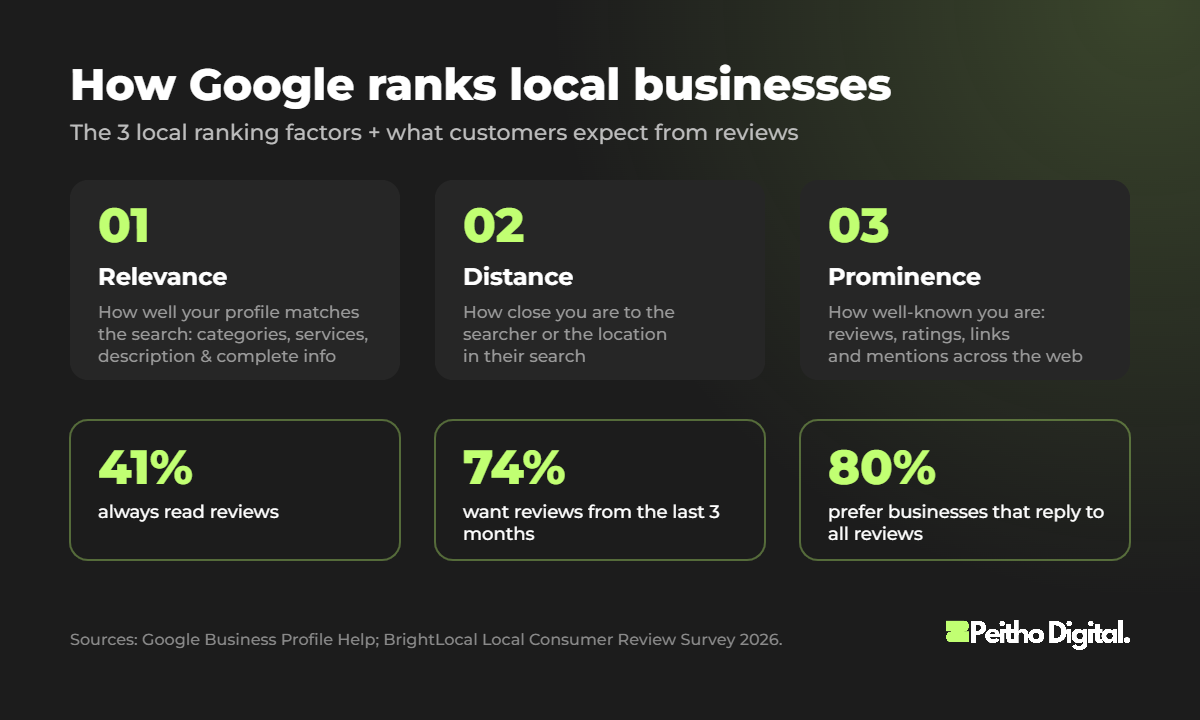
According to Google’s own guidelines, local results are based on three main factors:
- Relevance: how well your profile matches what the person is searching for.
- Distance: how far your business is from the searcher (or from the location in their search).
- Prominence: how well-known your business is, based on reviews, ratings, links and mentions across the web.
Google is also clear that there’s no way to pay for a better local ranking. You can’t change your distance, but you can massively improve your relevance and prominence. That’s exactly what the 12 steps below do.
1. Claim and Verify Your Profile
Search for your business on Google Maps. If a profile already exists, claim it; if not, create one at business.google.com. Then complete verification (by video, phone, email or postcard, depending on what Google offers you). Verified businesses are far more likely to appear in local results.
2. Choose the Right Primary Category
Your primary category is one of the strongest relevance signals you control. Be specific: “Italian restaurant” beats “Restaurant”, and “Digital marketing agency” beats “Consultant”. Then add a few secondary categories for the other services you genuinely offer, but don’t add categories that don’t describe your core business.
The Peithō Way: Before choosing categories, we check which categories the top 3 competitors in your area use. It’s one of the quickest wins in local SEO.
3. Use Your Real Business Name (No Keyword Stuffing)
It’s tempting to name your profile “Peitho Digital – Best SEO Agency Athens Google Ads”. Don’t. Adding keywords to your business name breaks Google’s guidelines and can get your profile suspended. Use your real-world name, exactly as it appears on your signage and documents.
4. Complete Every Single Field
Google says that businesses with complete and accurate information are more likely to show up in local results. Fill in everything that applies:
- Address (or service area if you visit customers)
- Phone number and website
- Opening hours, including special hours for holidays
- Attributes such as parking, Wi-Fi, wheelchair access or online appointments
- Opening date and appointment / booking links
5. Write a Helpful Business Description
You have 750 characters to explain what you do, who you help and where. Put the most important information in the first 250 characters, mention your main services and area naturally, and avoid links, promotions or ALL CAPS.
6. Add Your Services and Products
List each service with a short description (and prices if you’re comfortable sharing them). This helps Google match your profile to more specific searches, and helps customers understand exactly what you offer before they call.
7. Upload Real Photos and Videos Regularly
Add your logo and cover photo, then real photos of your premises, team, products and work. Avoid stock images. Add new photos every month: an active profile signals a real, active business to both customers and Google.
8. Get More (and Fresher) Reviews
Reviews are the biggest prominence signal you can influence. According to BrightLocal’s 2026 Local Consumer Review Survey, 41% of consumers always read reviews when choosing a local business, and 74% look for reviews from the last three months. A stream of fresh reviews beats a big pile of old ones.
- Ask every happy customer, right after a successful job.
- Send your direct review link by SMS, email or WhatsApp, or put it on a QR code at your counter.
- Never buy reviews or offer discounts in exchange for them. It breaks Google’s policies and can get reviews removed or your profile restricted.
9. Reply to Every Review, Personally
The same BrightLocal survey found that 80% of consumers are more likely to use a business that replies to all its reviews, but half are put off by generic, templated replies. Thank people by name, mention what they bought or experienced, and handle negative reviews calmly with a clear offer to fix the issue.
The Peithō Way: We reply to negative reviews within 24 hours, never argue in public, and always move the conversation to the phone or email. Future customers are reading how you handle problems.
10. Publish Google Posts Every Week
Posts let you share offers, news, events and new work directly on your profile. They keep your profile fresh and give customers another reason to choose you. A simple weekly post with a real photo and a clear call to action is enough.
11. Keep Your Business Info Consistent Everywhere
Your name, address and phone number (NAP) should be identical on your website, social media, directories (like Vrisko, Xo.gr or Yelp) and industry listings. Inconsistent details confuse Google and weaken your prominence.
12. Support Your Profile With Your Website
- Add your address, phone and an embedded Google Map on your contact page.
- Use LocalBusiness schema so search engines can read your details.
- Create pages for each main service, and for each area you serve if relevant.
- Make sure your site is fast and mobile-friendly. Most local searches happen on mobile.
- Add UTM tags to your profile’s website link so you can see the traffic in Google Analytics.
Common Mistakes That Hurt Local Rankings
| Mistake | Why it hurts |
|---|---|
| Keywords in the business name | Breaks Google’s guidelines; risk of suspension |
| Virtual office or PO box as address | Not allowed for most businesses; can lead to removal |
| Duplicate profiles | Splits reviews and confuses Google |
| Wrong or outdated hours | Frustrated customers and negative reviews |
| Fake or incentivised reviews | Reviews removed, profile restrictions |
| Ignoring reviews | Lower trust and fewer clicks |
Frequently Asked Questions
Is Google Business Profile free?
Yes. Creating and managing a Google Business Profile is completely free. Google also states that there is no way to pay for a better local ranking.
How long does it take to rank higher on Google Maps?
Simple fixes like categories, complete info and photos can help within a few weeks. Building reviews and prominence is an ongoing process that usually shows strong results over a few months.
How many Google reviews do I need?
There’s no magic number. What matters is having more recent, genuine reviews than your local competitors and a high average rating. Aim for a steady flow of new reviews every month.
Can I have a Google Business Profile without a physical address?
Yes. If you serve customers at their location, you can set up a service-area business and hide your address. You still need a real address for verification.
Should I use keywords in my business name?
No. Adding keywords that aren’t part of your real business name breaks Google’s guidelines and can get your profile suspended.
Next step: local customers increasingly ask AI assistants for recommendations too. Read How to Get Your Business Recommended by ChatGPT & Google AI.
Want More Calls From Google Maps?
Local SEO is often the fastest way for a small business to get more calls and visits from Google. If you want us to audit your profile and your local competition, book a free strategy session. Curious about budgets? Read How Much Does SEO Cost in 2026? or explore our SEO & AI search services.